
Quick Start Guide
Your Backdraft Wyvern prototype is here. This guide walks you through what's in the box, connecting your electronics, pairing the app, and dialing in your settings. Watch the video, then use the steps below as your reference.

Backdraft Control App Guide: Pair, Configure & Tune Your HPA Engine Like a Pro
The Backdraft Control app (available on iOS and Android) is the companion software for Backdraft’s Catalyst Wireless FCU. It turns your phone into a full tuning station, letting you adjust performance without opening the gun or pressing tiny buttons. This guide follows the natural workflow most users should use: 1. Pair 2. Update 3. Select Preset 4. Configure 5. Settings
Step 0: Wire Up Your Catalyst Wireless
Mount the FCU, wire harness and trigger board first (V2 trigger board for M4 gearboxes, V3 for AK). Then connect everything as shown in the wiring diagram below:
Battery lead: 2S-3S LiPo battery
Trigger Board: the trigger board in your gearbox
Output 1: Solenoid 1 (your engine's solenoid)
Output 2: Solenoid 2 or an accessory (dual-solenoid engines, tracers, box mags)
Input: multi-use input
Single-solenoid engines like the Backdraft Phoenix only need the battery, trigger board and Output 1. Once it's wired, power it on and pair it with the app (step 1 below). The default PIN is 123456.
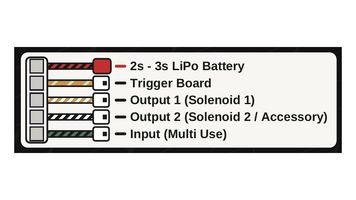
Catalyst Wireless wiring diagram
1. Getting Started: Pair, Update & Select a Preset
1. Power on your Catalyst Wireless FCU and open the Backdraft Control app. 2. Tap "Scan for Devices". Select your FCU when it appears. 3. Enter the pairing PIN (default is 123456, and you can change it later in Settings). 4. Once connected, check for a firmware update and install it if available. 5. Go to the "Profiles" section in the side menu and either load an existing profile or create a new one. Saving presets early lets you quickly switch between different guns or field rules later.
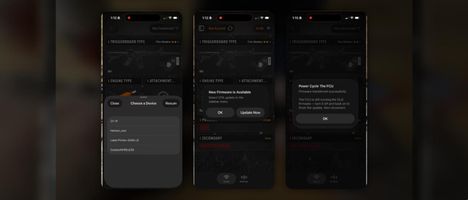
Pick CatalystWIRELESS from the device list, tap Update Now, then power cycle the FCU
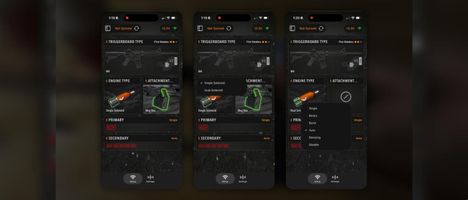
The Configure page: pick your engine type (single or dual solenoid), attachment and fire modes
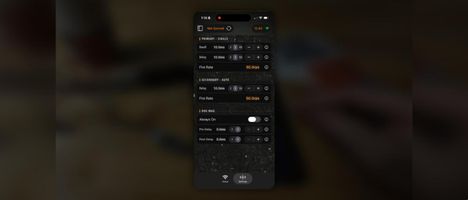
The Settings page: dwell, delay and fire rate for each fire mode, plus box mag settings when one is configured
Dual solenoid selected on the Configure page, and the nozzle (n) and poppet (p) dwell and delay settings it unlocks
5. Side Menu / Additional Toggles & Features
The side menu (or navigation drawer) contains the supporting tools that make the app powerful: Features: 1. Presets / Loadouts – Save and load complete profiles (very useful when one FCU is shared between multiple guns). 2. Auto Upload / Live Sync – When enabled, changes you make in the app are sent to the FCU immediately. This is excellent for real-time tuning at the chronograph. 3. Sync Dwell / Delay – Some versions let you link or unlock the relationship between dwell and delay. 4. Device Name & PIN – Rename the FCU and change the pairing PIN. 5. Firmware Update – Check and install updates. 6. Advanced / Diagnostic options – Additional parameters that appear based on your Configure settings. These side-menu features stay accessible no matter which main page you are on, so you can jump between presets, turn live upload on/off, or update firmware without leaving the tuning workflow.
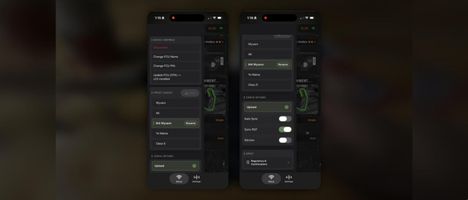
The side menu: device controls (name, PIN, OTA update), saved presets, and the Auto Sync and Sync ROF toggles
Wireless, but affordable
If you’ve been following the rapid evolution of affordable high-performance airsoft HPA systems, you’ve probably heard of Backdraft Innovations and our Catalyst Wireless Fire Control Unit (FCU). The real game-changer isn’t just the tiny wireless board itself—it’s the Backdraft Control companion app, now available on both iOS and Android.
This free mobile app turns your smartphone into a powerful tuning station for your HPA setup. Instead of fumbling with tiny buttons or potentiometers on the FCU, you can make precise adjustments right from your phone.
Key Features of the Backdraft Control App
Simple Pairing
Scan for nearby devices, enter the configurable PIN (default is 123456), and you’re connected. You can also rename the FCU and update its firmware directly through the app.
Intuitive Tuning Interface
Adjust critical parameters such as dwell and delay with fine increments (0.1 ms, 1 ms, or 10 ms steps). The settings screen dynamically changes based on your configuration, so you only see relevant options.
Advanced Fire Modes
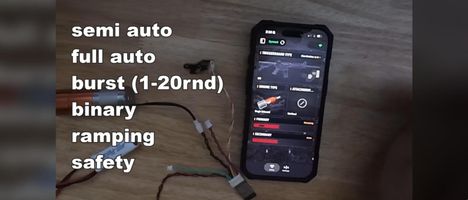
Choose from single, binary, burst (with customizable shot count), full auto, ramping, semi-capped, safety, and experimental fire modes! Primary and secondary selector positions can be programmed independently.
Loadout Presets & Profiles
Save multiple presets (typically 1–5) so you can quickly switch between different gun setups or field rules. This is especially useful if you move one FCU between multiple replicas.
Live Tuning & Accessory Support
Enable live uploads for real-time adjustments while testing. The second output can control tracers, box magazines, or future accessories. Expansion options are already planned for features like mag detection and specialized fire modes.
Clean, Modern Design
The interface prioritizes speed and clarity—perfect for both competitive players who need quick changes and technicians who want full control without opening the gun.
Why It Matters for HPA Players
With Backdraft Control, you can fine-tune dwell for optimal efficiency, dial in rate of fire, or switch fire modes between games. Combined with Backdraft’s affordable Phoenix HPA engines, it brings pro-level customization to a much wider audience.
The app works with Backdraft’s wireless boards, including the Catalyst Wireless FCU. It’s lightweight, collects no personal data according to the developer, and focuses purely on giving you control over your airsoft replica.
Whether you’re building your first HPA gun or refining a tournament setup, the Backdraft Control app removes a lot of the friction from tuning. Download it from the App Store or Google Play, pair your Catalyst Wireless FCU, and experience just how convenient modern HPA control can be.
Have you tried the app yet? Send us your favorite settings and tuning tips. We'd love to see what you come up with!